Top 10 Best Metal 3D Printers


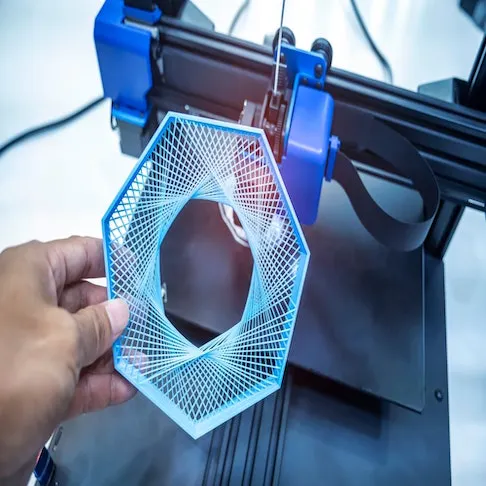
The top 10 Best 3D Printers are tools in modern manufacturing that build physical objects layer by layer from a digital design file. The best 3D printer uses controlled deposition, melting, or sintering of metal material (powder or filament) to produce final parts, eliminating the need for traditional casts, molds, or subtractive machining. The process supports complex shapes, internal channels, and lightweight structures that are difficult or costly with conventional methods.
In metal 3D printing, distortion and residual stresses arise primarily from steep thermal gradients and rapid solidification, not merely uneven heat distribution. Inaccurate calibration leads to dimensional errors, improper orientation that increases internal stresses, and material incompatibility that causes poor layer adhesion or surface defects. The problems reduce print quality, increase waste, and extend production time, lowering the return on investment and efficiency.
The best 3D printers are the desirable models, a combination of precision, repeatability, and material versatility. High‑quality machines deliver consistent dimensional accuracy, stable performance across multiple prints, and a wide range of compatible metals (including stainless steel, titanium, and aluminum) for diverse applications (aerospace brackets, medical implants, industrial tooling). Printers that effectively manage heat, maintain tight tolerances, and minimize failure rates deliver superior outcomes and improve manufacturing productivity.
What Is a 3D Printer?
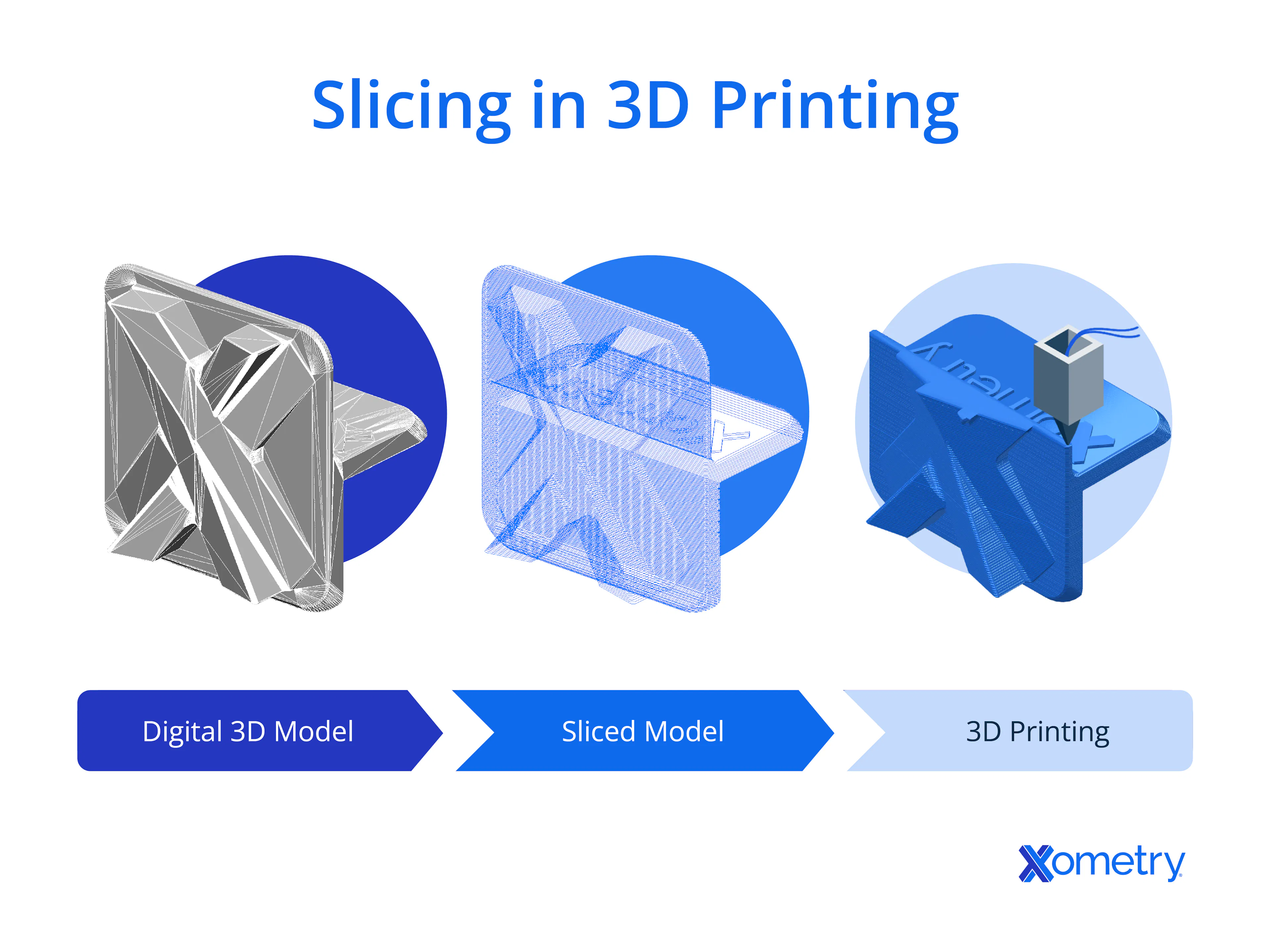
A 3D printer is a machine that creates physical objects layer by layer from a digital design file (plastic prototypes, resin dental models, metal machine components). A 3D printer interprets a three-dimensional model generated through computer-aided design software, then converts the geometry into thin horizontal layers for sequential fabrication. A 3D printer deposits or solidifies material following precise toolpaths defined by the digital file, which produces accurate geometry with controlled dimensions.
A 3D printer uses materials (thermoplastics, photopolymer resins, metal alloys, and ceramics), depending on the printing process selected. Plastic-based systems rely on heated extrusion to shape polymers into solid forms. Resin-based systems rely on light exposure to cure liquid photopolymers into hardened layers. Metal-based systems rely on powder melting, binder deposition, or bound metal processes followed by sintering to achieve dense metallic structures.
3D printing reduces or eliminates molds and some tooling, but subtractive machining is frequently required for tight tolerances and surface finish. A 3D printer enables precise production by following exact digital instructions, which limits material waste and dimensional deviation. A 3D printer supports complex geometry creation, internal channels, lattice structures, and consolidated assemblies that traditional manufacturing methods struggle to produce efficiently.
How To Choose the Best Metal 3D Printers
To choose the best Metal 3D Printers, there are six steps to follow. First, define the primary application focus (functional prototyping, serial production, certified end-use parts) because process suitability depends on geometric complexity, tolerance expectations, and surface finish requirements. Second, evaluate metal printing technology options (laser powder bed fusion, binder jetting, bound metal deposition, nanoparticle jetting) since each process governs density levels, post-processing stages, and facility demands. Third, assess material compatibility by matching required alloys to supported material ecosystems (stainless steel, titanium, aluminum, nickel-based alloys) because mechanical performance, thermal resistance, and corrosion behavior differ across metals. Fourth, analyze operational requirements covering powder handling, ventilation, safety controls, operator training, and post-processing equipment since infrastructure affects total ownership cost. Fifth, compare build volume, throughput capacity, and repeatability controls to align production scale with expected output. Lastly, review software workflow, process monitoring, and service support availability to maintain long-term manufacturing stability and consistent quality across production cycles.
How Do Experts Determine the Best Metal 3D Printer?
Experts determine the best metal 3D printer by evaluating the factors (performance, accuracy, material range, and reliability). Performance is assessed by how effectively a printer produces parts (speed, precision, and consistency) over extended runs. Accuracy refers to the printer’s ability to produce parts that meet tight tolerances and dimensional requirements. The material range is important, as a wider selection of metals (titanium, stainless steel, and tool steels) allows for more versatile applications. Reliability is determined by assessing the system’s uptime, consistency of part quality, and the availability of maintenance or service.
Technical benchmarks and real-world tests are integral to this evaluation. Experts perform tests like tensile strength analysis, thermal performance evaluation, and fatigue testing to measure how well the printed parts perform in real-world conditions. Relevant standards include ISO/ASTM 52900 (terminology), ISO/ASTM 52921 (coordinate systems), ASTM E8 (tensile testing), ASTM E466 (fatigue), ASTM E384 (microhardness), and industry-specific standards (aerospace qualification frameworks). The structured approach guarantees an objective and practical selection process, helping users choose the right 3D printer for their specific needs, whether for prototyping, small-batch production, or high-volume manufacturing.
Are Performance and Materials Used to Define the Best 3D Printer?
Yes, performance and materials are used in defining the best 3D printer. Performance measures how efficiently the printer operates, focusing on aspects like print speed, precision, and consistency over time. High-performing printers ensure that parts meet required specifications and are produced within set timelines. Materials determine the printer’s versatility and application scope. A printer that supports a wide range of materials (metal alloys, polymers, or composites) offers greater flexibility and caters to different industries (aerospace, automotive, or medical manufacturing).
Performance and materials are interdependent and vital to a printer’s effectiveness. Performance alone does not ensure high-quality output if the material selection is limited or incompatible with the desired application. A broad material range is of little use if the printer does not produce parts with the required accuracy and reliability. Balancing performance and materials is important for achieving the best results, ensuring high-quality production, and meeting specific industry needs.

What Makes a Metal 3D Printer the Best?
The best metal 3D printer offers precision, reliability, and a material range. Precision ensures that the printer produces parts with tight tolerances, which is important for industries that require high-quality, functional components. Reliability is equally important, as a dependable printer ensures consistent output without frequent breakdowns or maintenance issues. The material range is crucial because it defines the printer's versatility in handling various alloys (stainless steel, titanium, aluminum) and materials suited for different applications (aerospace, automotive, and medical industries).
Consistent output is critical in determining the best metal 3D printer. A printer that produces the same quality parts across multiple production runs without variations in mechanical properties or dimensions is invaluable. The consistency leads to predictable performance, minimizing errors and the need for rework or part rejection.
Performance defines value, as a metal 3D printer's ability to produce high-quality parts quickly and accurately impacts production time and cost. Speed, layer resolution, material compatibility, and post-processing requirements all contribute to the value of the machine. The performance factors ensure that the Best Metal 3D Printers meet the demands of advanced manufacturing and support high-volume, complex part production without sacrificing quality.
What is the Best Metal 3D Printer for Beginners?
Beginner-focused metal printers provide performance that supports entry-level learning curves without sacrificing part integrity or precision. The printers deliver consistent, functional metal components, creating a learning environment where new operators focus on design, workflow, and post-processing. Beginner-oriented systems offer a safe workflow by reducing exposure to loose metal powder and simplifying handling and maintenance. Well-chosen beginner printers feature guided software, automated calibration, and predictable print results, allowing users to produce usable metal pieces that demonstrate real strength and detail. Industrial applications benefit most when beginner systems produce parts that meet the mechanical requirements and tolerances seen in production contexts. Producing strong, complex parts bridges prototyping and practical use. The value of a beginner metal 3D printer lies in its combination of accessible operation and real-world applicability, increasing confidence and paving the way for advanced manufacturing tasks.
Is a Metal 3D Printer Useful?
Yes, a metal 3D printer is useful. Metal 3D Printer produces strong, complex parts with high precision, making it ideal for industries that require durable and intricate components. The printers allow the creation of geometries that are difficult to achieve using traditional manufacturing methods. Metal 3D printing is particularly beneficial for rapid prototyping, custom tooling, and low-volume production. It allows manufacturers to test designs quickly and make modifications without the need for expensive molds or tooling.
Industrial applications benefit most from metal 3D printing because it supports the production of parts that require high strength, heat resistance, and complex internal structures. Industries (aerospace, automotive, and medical) rely on the printers for producing functional, high-performance components. The ability to create complex geometries without added weight or material waste offers advantages in sectors where performance, efficiency, and material properties are critical.
How Much Does a Metal 3D Printer Cost?
Metal 3D printers range from ~$80,000 to $150,000 for entry-level bound metal systems, ~$250,000 to $1,000,000+ for industrial LPBF systems, and multi-laser or large-format systems exceed $1.5 to 2 million, depending on the system's capabilities, size, and technology. Entry-level models suitable for small-scale applications or prototyping start around [$50,000], while industrial-grade systems with higher build volumes, advanced features, and precision range from [$200,000] to [$500,000].
Price varies by the printing technology used, as systems based on binder jetting or bound metal deposition are less expensive compared to laser powder bed fusion or direct metal laser sintering, which offer higher precision and material versatility but come at a higher price point.
Operating costs add expenses, as they include material costs (metal powders or wires), maintenance, post-processing equipment, and energy consumption. Material costs for high-quality metal powders are substantial, and ongoing maintenance requires professional service or replacement parts. The additional costs must be considered when evaluating the total investment required for a metal 3D printer in industries where high-volume production is expected. Total cost of ownership (TCO) should also include Inert gas supply; Powder handling and recycling systems; Facility upgrades (ventilation, explosion mitigation compliance where applicable); Labor and training; Quality assurance equipment.
STEP files are the preferred starting point for metal additive work because they preserve true design intent rather than just surface triangulation. In production environments, this parametric continuity reduces iteration time, since dimensional changes or tolerance adjustments can be made directly in the native CAD model without rebuilding geometry from scratch. STEP also supports better traceability between design revisions and printed output, which is critical for qualification and documentation. When paired with a robust slicing and simulation workflow, STEP-based models consistently produce more predictable results than mesh-only formats. For metal printing, where small geometric errors can translate into large downstream costs, that predictability has real operational value.
How Long Does it Take to Recover the Investment?
Payback periods for metal 3D printers vary widely and can range from less than 1 year to 3-5+ years depending on capital cost, utilization rate, application fit, post-processing cost, and industry sector.
Usage volume drives recovery, as the savings in tooling, material waste, and lead time accumulate rapidly against the initial investment when a metal 3D printer produces large numbers of complex, functional parts regularly. Regular use of end‑use components in aerospace, automotive, or tooling workflows spreads equipment costs over more parts, reducing per‑part cost and accelerating the break‑even point.
Higher utilization shortens ROI, when printers operating near full capacity with predictable demand recover costs faster because fewer idle hours mean more parts produced for the same overhead. Maximizing machine runtime and aligning production needs with strategic part output are central to turning a metal 3D printer investment into net positive returns in the shortest timeframe.
Is Metal 3D Printing Cost-Effective?
Yes, metal 3D printing is cost-effective in the right use cases. Metal additive manufacturing delivers value when producing low‑volume complex parts that are expensive or impractical to make with traditional machining or casting methods. The ability to fabricate intricate geometries without tooling reduces upfront costs for customized or limited‑run components. Industries where unique, functional metal parts are required (aerospace brackets, medical implants, specialized tooling) see meaningful cost advantages because metal 3D printing eliminates traditional manufacturing constraints.
Low‑volume complex parts benefit most because the absence of tooling, molds, or fixtures lowers early production costs. Traditional methods demand costly fixtures and extended setup times for parts with internal channels, conformal cooling, or topology‑optimized shapes. Metal 3D printing shortens lead times and reduces waste by building parts layer by layer, which translates to lower part cost when complexity outweighs volume.
Efficiency depends on the application, as high‑volume, simple parts remain more economical with conventional manufacturing, whereas customized, performance‑critical, or low‑quantity parts realize clear cost benefits from metal 3D printing. The match between part requirements and the printer’s strengths determines whether the technology delivers cost effectiveness in each scenario.
What Are the Most Common Issues Users Face with 3D printers?
The most common issues users face with 3D printers are listed below.
- Clogged Nozzles: The clogged nozzles prevent smooth material flow, causing inconsistent layer deposition. The issue leads to poor surface finish and potential print failures, affecting the performance and reliability of prints.
- Inaccurate Calibration: Poor calibration leads to misaligned prints or distorted geometries. Miscalibration with bed leveling or extruder alignment results in failed prints and wasted materials, impacting production efficiency.
- Material Incompatibility: Printers struggle with specific materials (filaments or powders), leading to poor adhesion, warping, or inconsistent quality. The issue limits the versatility of the 3D printer and reduces its application range.
- Layer Separation: The layer separation occurs when layers fail to properly bond due to low print temperature or improper cooling settings. The separation compromises part strength, reduces durability, and makes parts unsuitable for their intended function.
- Warping: The warping is a common issue when cooling too rapidly or using unsuitable build surfaces. Warped prints do not adhere well, leading to dimension errors and weak parts that are prone to breakage.
- Overheating: Excessive heat causes printers to malfunction or produce low-quality prints. Overheating issues affect material extrusion, detail resolution, and printer longevity.
- Uneven Extrusion: Irregular extrusion of material can result from inconsistent filament diameter, clogs, or hardware issues. It disrupts layer consistency, causing gaps, stringing, and imperfections, which directly impact print quality.
How do they affect overall performance? The common issues affect the overall performance through print failures, dimensional inaccuracies, poor surface finishes, and wasted material, which reduce efficiency and increase production time. Users face delays and additional maintenance, which lowers the reliability of the printer and affects the final product's quality. Addressing the issues is important for maintaining consistent print performance and minimizing downtime.
What Causes Warping or Defects in Metal 3D Printing?
Warping and distortion are primarily caused by steep thermal gradients, rapid solidification, and constrained shrinkage during layer-wise melting—not merely uneven heat distribution. The defect is problematic when parts are large or feature thick and thin sections, which cool at different rates. The uneven cooling causes parts to contract or expand at different rates, leading to warping or deformations.
Thermal stress distorts layers during the cooling phase of the printing process. The lower layers cool and contract, while the upper layers remain molten or semi-molten for longer, creating tension between the layers as metal parts are printed. The tension causes parts to bend, lift off the build plate, or crack.
Material behavior amplifies defects when metals (aluminum) have high thermal expansion rates, making them more prone to warping during printing. Materials (titanium) exhibit internal stresses that lead to deformation. Variations in the material's composition, print speed, and cooling rates contribute to the development of the defects. The 3D Print Warping with PLA, PETG and ABS occurs in plastic-based 3D printing, and metal 3D printing faces similar challenges when it comes to managing heat distribution and material behavior.
Does Proper Heat Management Affect 3D Print Success?
Yes, proper heat management is critical for 3D print success. Proper heat management plays a fundamental role in controlling the melting and cooling processes of the material during printing by ensuring that the material melts uniformly and cools at a controlled rate. The heat management prevents issues like warping, poor layer adhesion, and dimensional inaccuracies. Precise temperature control helps maintain optimal conditions for powder melting and layer bonding, leading to higher part quality and fewer defects for metal 3D printing.
Proper heat management controls melting and cooling, which are important for achieving consistent results. Melting causes thermal stress, leading to cracks, warping, or weak spots if the material cools too quickly. Controlled cooling ensures that each layer bonds correctly to the previous one, improving part strength and surface finish. Maintaining an optimal printing temperature prevents material degradation and ensures that the final product meets the required mechanical properties.
Stability improves outcomes by improving the print quality, ensuring that each part is produced with minimal errors and high precision. Stability is important in industrial applications, where consistent quality and performance are crucial. 3D printers achieve higher accuracy, faster production speeds, and reduced post-processing time, improving the efficiency and cost-effectiveness of the manufacturing process by managing heat effectively.
How Does Design Preparation Impact Metal 3D Printing Results?
Design preparation impacts metal 3D printing results by determining print feasibility and final part quality. Proper preparation ensures that the design is suitable for the selected printing method, supports optimal material flow, and minimizes post-processing challenges. It begins with considering the geometry, layer orientation, and build volume as factors that influence how the material is deposited and solidified during the printing process.
Wall thickness and tolerances matter because they affect the mechanical properties and the structural integrity of the final part. Thin walls lead to weak points or warping due to uneven cooling. Thick sections more commonly cause heat accumulation, increased residual stress, and distortion; bonding quality depends on energy density, not thickness alone. or excessive thermal stress. Correctly sized walls and tight tolerances ensure that the part maintains its desired strength, dimensional accuracy, and functionality for high-stress applications in industries (aerospace and medical).
Poor design increases the risk of print failure by leading to issues (inadequate support structures, excessive overhangs, or internal stresses). The design flaws cause parts to warp, crack, or fail during printing or post-processing. Inadequate support and improper orientation result in print defects, requiring additional time and resources for correction. Engineers minimize the risks, ensuring a higher chance of success in the final part production by carefully planning the design.
How Do Supports and Infill Affect Metal Print Quality?
Support and Infill affect metal print quality by stabilizing metal prints, directly impacting the final print quality. Supports are structures that are added to provide extra stability to overhanging parts or complex geometries during the printing process. Supports and Infill prevent warping, reduce the risk of part deformation, and ensure that intricate shapes do not collapse under their own weight. In most metal powder bed fusion systems, parts are printed fully dense by default (>99% density). “Infill percentage” is primarily a polymer (FFF/FDM) concept. Metal systems use lattice structures or topology optimization when internal density reduction is desired.
Supports and infill manage stress and shape by distributing weight evenly throughout the print. Proper support structures help manage thermal stresses that cause warping, cracking, or distortion during cooling for metal 3D printing. In metal AM, internal lattice structures or topology-optimized designs influence weight and mechanical performance; standard infill patterns are not commonly used as in polymer extrusion, which are important in determining its functionality for specific applications.
Improper settings for supports and infill reduce print quality, as too much support material results in increased post-processing time to remove the structures, while too little support leads to print failure or dimensional inaccuracies. Inadequate infill causes weak parts that lack the necessary strength for functional use. Properly configuring supports and infill ensures successful Infill in 3D Printing with the desired strength, accuracy, and minimal waste.
How do Orientation Affect Metal print quality? Orientation affects metal print quality by influencing factors (strength, surface finish, and dimensional accuracy). The way a part is oriented on the build plate determines how the layers are deposited, how the material cools, and how stresses are distributed throughout the print. Improper orientation leads to weak points, poor layer adhesion, and dimensional inaccuracies, while optimal orientation helps improve part integrity and reduces potential issues. The right orientation helps distribute thermal stresses more evenly, minimizing warping and cracking. Thermal contraction under constraint generates residual stresses, which can cause distortion or cracking; layers do not typically misalign unless distortion occurs during the build, leading to part distortion when parts with thin sections or overhangs are printed in an unfavorable orientation. Printing parts in the optimal direction allows for better bonding between layers, improving the strength and stability of the final print.
Is Improper Orientation a Common Cause of Failed Metal Prints?
Yes, improper orientation is a common cause of failed metal prints. Orientation during the 3D printing process impacts how the material layers are deposited, and when not optimized, it leads to increased stress, distortion, and structural weaknesses in the final part. The way a part is oriented on the build plate determines the direction of the layers, which directly influences how the part reacts to thermal stresses during printing.
Improper orientation increases stress and distortion because it causes uneven cooling and thermal expansion. Parts printed with an unfavorable orientation experience warping or cracking due to internal stresses that build up as layers cool at different rates. Parts with large unsupported overhangs or thin features become distorted or fail to adhere properly to the build plate.
Orientation impacts success rates by affecting print quality and mechanical properties. A well-chosen orientation minimizes the need for excessive support structures, reduces the risk of warping, and improves layer adhesion. Designers improve part strength, reduce post-processing, and avoid common printing failures, leading to a more successful and efficient metal 3D printing process by selecting the optimal orientation.
How Do You Convert STL Files for Metal Printing?
You can convert STL Files for metal printing by following the x steps below.
- Open the STL File in Specialized Build Preparation Software. Start by opening the STL file in a build preparation software that is compatible with metal additive manufacturing (AM). Metal AM workflows often use specialized software (OEM-specific programs for Laser Powder Bed Fusion (LPBF) or binder jetting systems). The tools handle the complexities of metal printing and allow for the proper configuration of print settings.
- Check the Model for Errors. Inspect the STL file for errors (non-manifold edges, holes, or inverted normals). Specialized software includes repair tools to fix common issues that impact print quality.
- Define Print Orientation and Supports. Choose the optimal orientation for the model to minimize the need for support structures and improve part strength. The software allows users to add support structures where necessary, ensuring the model prints correctly and prevents deformation during the process.
- Configure Print Settings. Adjust the print parameters for the specific metal 3D printing process (layer height, laser power, and build speed). Each metal AM technology has unique settings that must be tailored to ensure a successful print.
- Generate and Export the G-code or Print File. The software generates the required G-code or equivalent file that contains instructions for the 3D printer once the model is prepared. The file is then sent to the metal printer for the actual printing process. The steps provide a Complete Guide to 3D Printing STL Files.
Can Improper STL Conversion Lead to Print Inaccuracies in Metal Parts?
Yes, improper STL conversion can lead to print inaccuracies in metal parts. STL (stereolithography) files are used to define 3D models for 3D printing, and errors during the conversion process result in geometry distortions that directly impact print quality. Missing surfaces, incorrect facet alignment, or non-manifold edges occur, leading to errors in the final print when the original model is incorrectly translated into an STL format.
Geometry errors distort prints by causing the layers to misalign or fail to adhere properly during the printing process. The errors result in gaps, misprints, or structural weaknesses that compromise the part’s mechanical properties. Discrepancies in geometry result in parts that do not meet the required tolerances, making them unsuitable for their intended application for metal 3D printing, where precision is crucial for functionality.
Precision is lost when the STL file does not accurately represent the original 3D model. Metal printing relies on high levels of accuracy, and even small inconsistencies in the STL file lead to large issues in the final print, including structural integrity problems or dimensional inaccuracies. Prepare and verify STL files before sending them to the printer, checking for errors that affect print quality and part performance to ensure successful prints.
What 3D Model File Formats are Compatible with Metal 3D Printers?
The 3D model file formats that are compatible with metal 3D Printers are listed below.
- STL (Stereolithography): The STL defines the surface geometry of a 3D object using triangular facets, a common file format for 3D printing. The format is widely used across various 3D printing technologies, including metal 3D printing.
- OBJ (Object File): The format includes information about the geometry and texture of a 3D model. OBJ is compatible with some metal 3D printers, formats that handle complex or high-detail models.
- AMF (Additive Manufacturing File Format): A newer format designed to handle advanced 3D printing features, AMF supports color, materials, and other properties in addition to geometry, making it ideal for more complex metal prints.
- 3MF (3D Manufacturing Format): The format is gaining traction in the 3D printing industry due to its ability to handle metadata and advanced materials, providing a more comprehensive approach than STL, developed by the 3MF Consortium.
- STEP (Standard for the Exchange of Product Data): A CAD-native solid model format (precise B-rep geometry). It is typically imported into build preparation software and converted into STL or 3MF before slicing. A highly detailed format that is used in CAD software for precise engineering and design applications.
- IGES (Initial Graphics Exchange Specification): A legacy CAD exchange format used for transferring geometry between CAD systems. It must be converted to a mesh format (STL/3MF) before metal printing.
Can STEP Files Provide Better Parametric Control for Metal 3D Printing?
Yes, STEP files offer better parametric control for metal 3D printing. STEP (Standard for the Exchange of Product Data) files retain design intelligence by preserving the geometry, the parameters, and relationships within the model. The STEP File allows for more detailed control over the design and ensures that the part is printed according to the exact specifications. It is useful in engineering and industrial applications, where precision and the ability to make design adjustments are crucial.
STEP files retain design intelligence, which means they hold parametric data (dimensions, constraints, and features). The capability makes it easier to update and modify the design without losing critical information. Using STEP files simplifies the design modification process and ensures that all related components are updated in metal 3D printing, where complex geometries and tight tolerances are required.
Modifications are easier with a STEP file because it allows designers to adjust parts parametrically without having to manually alter each individual feature. The STEP File leads to greater flexibility and faster turnaround times in design changes, making it easier to adapt designs for different applications.
Summary
Xometry provides a wide range of manufacturing capabilities, including 3D printing and other value-added services for all of your prototyping and production needs. Visit our website to learn more or to request a free, no-obligation quote.
Copyright and Trademark Notices
- HP METAL JET is a registered trademark of HP Hewlett Packard Group LLC.
- Velo3D Sapphire is a registered trademark of Velo3D, Inc.
- Inconel® is a registered trademark of Special Metals Corporation
- DESKTOP METAL, Production SystemTM, Studio SystemTM is a trademark of Desktop Metal, Inc.
- WarpSpEE3D® s a trademark of Effusiontech Pty Ltd PROPRIETARY LIMITED COMPANY
- Rapidia® is a trademark of Tech Inc BC company
- XJet® is a trademark of Xjet, Inc. CORPORATION
- DIGITAL METAL® is a trademark of AB CORPORATION
- Truprint® & trumpf® is a trademark of TRUMPF SE + Co. KG GMBH & CO. KG FED REP
Disclaimer
The content appearing on this webpage is for informational purposes only. Xometry makes no representation or warranty of any kind, be it expressed or implied, as to the accuracy, completeness, or validity of the information. Any performance parameters, geometric tolerances, specific design features, quality and types of materials, or processes should not be inferred to represent what will be delivered by third-party suppliers or manufacturers through Xometry’s network. Buyers seeking quotes for parts are responsible for defining the specific requirements for those parts. Please refer to our terms and conditions for more information.