
10 Steps on How to Remove Supports from 3D Prints


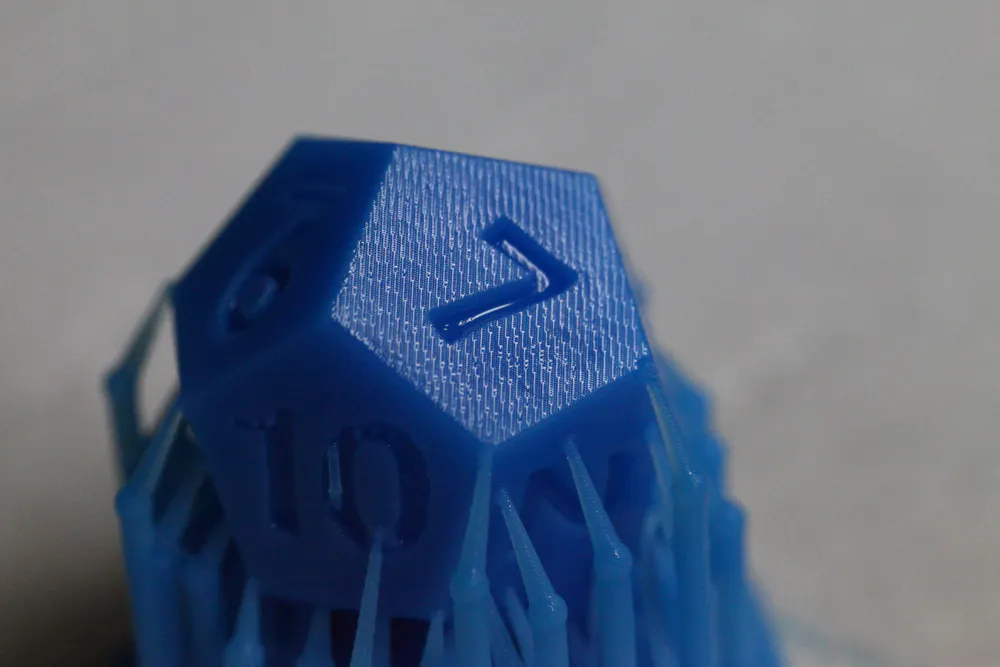
10 Steps on How to Remove Supports from 3D Prints begins with a clear understanding of support placement, tool selection, and controlled force during removal, and each step contributes to a cleaner surface finish and stronger final structure. Each of the 10 steps in removing supports from 3D prints ensures a smoother surface finish and improves the preparation process by guiding users through efficient detachment techniques.
For example, parts with small contact areas are more prone to stress concentration and fracture under force, illustrating the need for careful handling and balanced pressure during support removal to avoid damage. The process emphasizes gradual detachment, correct orientation, and steady trimming to ensure that each step contributes to a smoother post-processing workflow and better final results for 3D prints.
The 10 steps on how to remove supports from 3D prints are listed below.
- Let the print cool down completely. Cooling primarily solidifies the print and makes removal safer; warping occurs mainly during printing, not during removal.
- Use the right tools. Choosing the right tools (pliers, cutters, or spatulas) ensures controlled force, reducing damage and allowing a smoother, efficient workflow.
- Start from the easy-access supports. External supports detach more easily because they are more accessible, offering clear removal points.
- Proceed to the internal supports. Removing internal supports needs care due to confined spaces and delicate features, requiring slow, precise movements to prevent damage.
- Be patient and gentle during removal. Applying gentle force and controlled movements minimizes stress and breakage, ensuring a safer removal.
- Use a craft knife for fine-tuning and removing small remnants. A craft knife precisely trims leftover material, with each controlled cut improving surface quality for finishing.
- Sand and finish the surface for smoothness. Sanding smooths surface imperfections, improving tactile quality and visual appeal for a polished final product.
- Consider using water-soluble supports for complex prints. Water-soluble supports dissolve in water, protecting complex features and leaving minimal residue.
- Adjust support settings in the slicer software for future prints. Adjusting support density and placement in slicer software improves support efficiency, simplifies removal, and cuts material waste.
- Practice and learn from each print to improve technique. Repeated printing and support removal help understand material behavior, refining the method for smoother, more efficient 3D prints after processing.
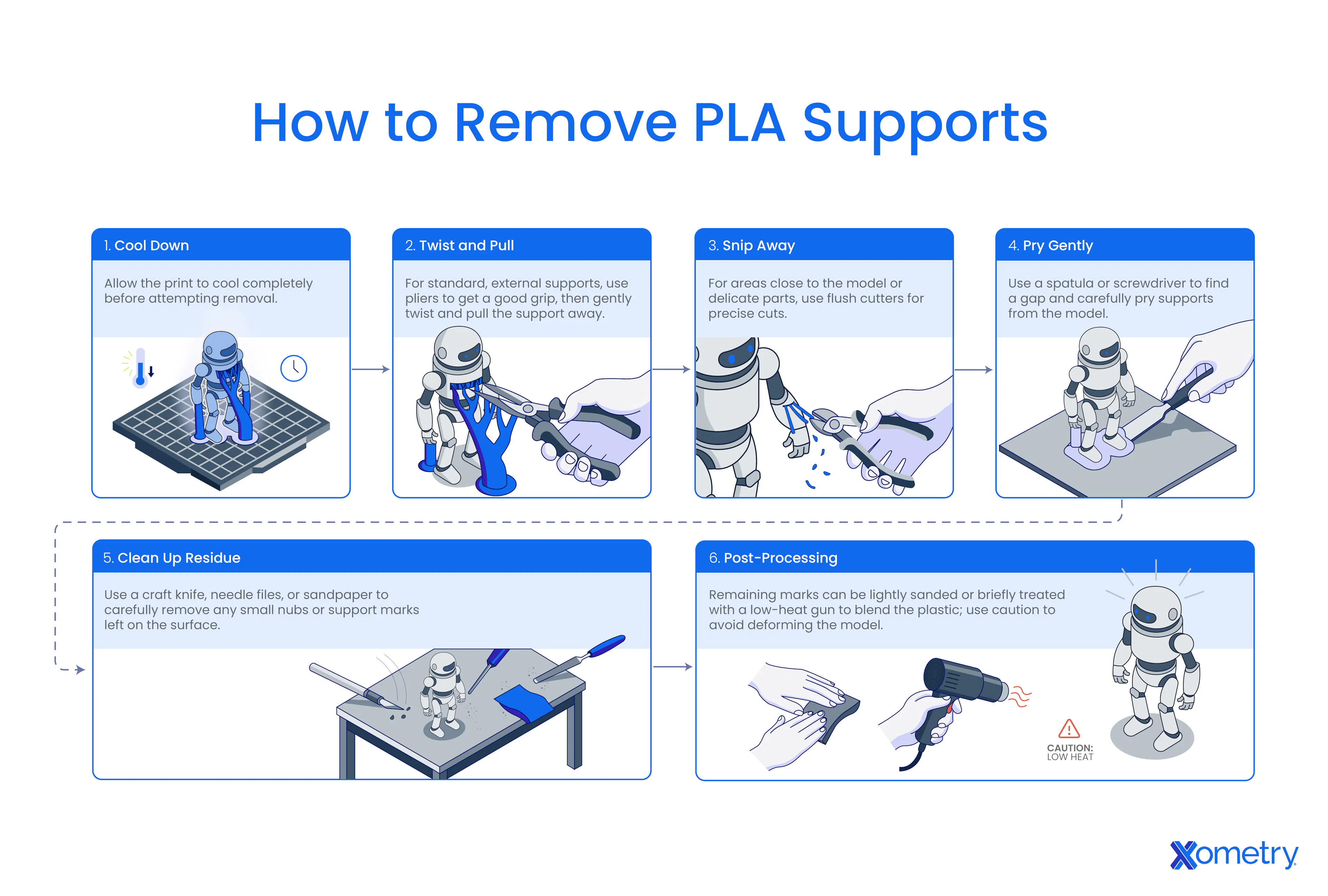
1. Let the Print Cool Down Completely
Let the print cool down completely to create a stable foundation for safe support removal. Allow the material to reach its natural resting temperature. Maintain structural integrity by avoiding contact during the cooling phase, which protects delicate features from unwanted pressure. Strengthen dimensional accuracy by letting the part settle, which reduces internal stress before trimming begins. Recognize the importance of the step, since proper cooling supports cleaner separation, preserves intended geometry, and prepares the printed piece for a controlled and efficient post‑processing workflow.
2. Use the Right Tools
Use the right tools to create a controlled and efficient support‑removal process. Select cutters, pliers, and knives with steady precision, which protects printed surfaces from unnecessary strain during trimming. Maintain consistent handling with well‑matched instruments, which preserves the intended geometry of every structural feature. Strengthen accuracy by relying on tools suited to each task, which reduces the risk of fractures and limits surface imperfections. Understand the significance of the step, as choosing the right tools affects safety, surface finish, dimensional accuracy, and long-lasting performance across the whole post-processing process.
3. Start From the Easy-Access Supports
Start from the easy‑access supports to establish a controlled beginning for the removal process. Clear open sections first to create better visibility, which strengthens accuracy when approaching tighter areas. Reduce strain on delicate surfaces by removing outer structures, which prevents unnecessary pressure on finer interior features. Maintain structural stability by progressing from open regions to confined regions, which supports a smoother transition into deeper sections of the model. The importance of the step lies in the fact that an organized sequence protects surface quality, preserves intended geometry, and prepares the part for more demanding finishing actions that follow.
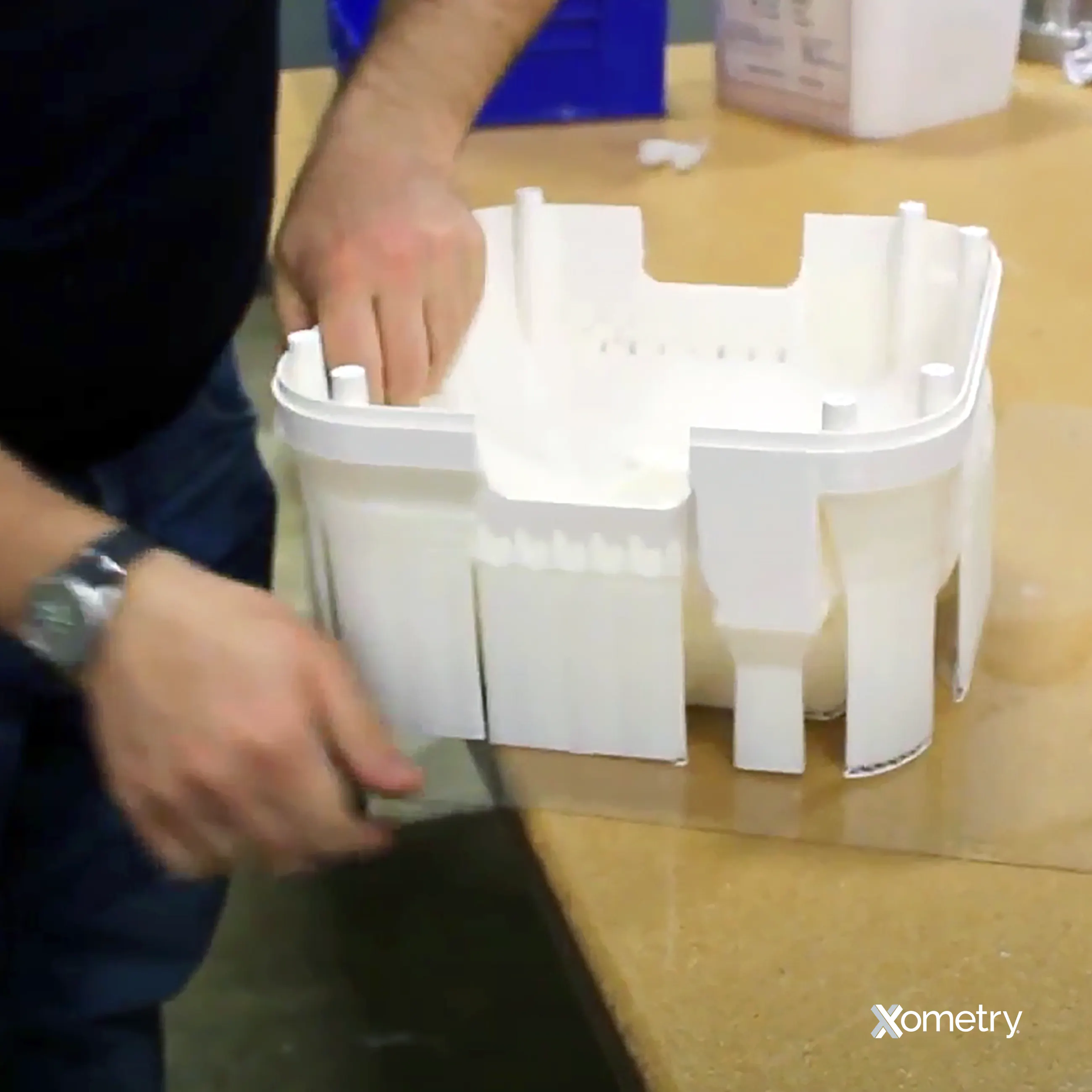
4. Proceed to the Internal Supports
Proceed to the internal supports after clearing the external sections to maintain an organized workflow. Remove confined structures with steady control, which protects narrow passages from stress during trimming. Preserve the intended geometry by carefully addressing hidden supports, which maintain the structural purpose of every printed feature. Limit the risk of fractures by progressing through interior regions, which prepares the part for later finishing steps. Acknowledge the importance of the step, as internal supports impact accuracy, stability, and long-term reliability.
5. Be Patient and Gentle During Removal
Be patient and gentle during removal to maintain steady control over every support connection. Apply light pressure during each motion, which protects fragile sections from stress that leads to cracks or distortion. Maintain a calm pace during trimming, which preserves the intended geometry of every printed feature. Reduce sudden force during separation, which prevents surface tearing and limits structural strain. Careful handling improves surface quality, supports dimensional accuracy, and ensures long-term reliability during the post-processing workflow.
6. Use a Craft Knife for Fine-Tuning and Removing Small Remnants
Use a craft knife for fine‑tuning and removing small remnants to create precise control during the final stage of support cleanup. Trim leftover material with a steady motion, which protects delicate surfaces from unwanted scratches. Shape tight corners with careful pressure, which preserves the intended geometry of every printed feature. Refine edges with light passes, which prepares the part for sanding, polishing, or coating. Accurate trimming strengthens surface quality, supports dimensional reliability, and establishes a clean foundation for the remaining finishing processes.
Support removal is a mechanically sensitive operation governed by material stiffness, interface geometry, and force direction rather than a simple cleanup step. Thermal stabilization prior to removal reduces residual stress, while sequencing from external to internal supports manages load paths and protects thin or functional features. Tool selection and controlled force application limit stress concentration at support contact points, reducing the risk of fracture or surface tearing. Support density, contact distance, and pattern selection in the slicer directly influence post-processing effort, making removability largely a function of pre-print decisions. Careful boundary recognition and fine finishing preserve dimensional accuracy and surface integrity in thermoplastic prints.
7. Sand and Finish the Surface for Smoothness
Sand and finish the surface for smoothness to create a refined exterior after support removal. Remove raised marks with steady abrasion, which restores a uniform texture across every supported area. Refine minor imperfections through controlled sanding, which prepares the material for polishing or coating. Strengthen visual quality by smoothing rough patches, which contributes to a clean and professional appearance during final inspection. Recognize the importance of the step because a well-finished surface improves durability, supports dimensional accuracy, and provides a consistent foundation for additional finishing processes.
8. Consider Using Water-Soluble Supports for Complex Prints
Consider using water‑soluble supports enable non-invasive removal for complex geometries, but effectiveness varies by material compatibility and design. Dissolution structures separate from the printed surface without direct force, which protects intricate features from unwanted stress. Gradual dissolution preserves delicate geometry, which maintains the intended form of every detailed section. A water‑based removal method reduces the risk of hidden fractures, which supports a smoother transition into sanding, polishing, or coating. The importance of the step lies in its influence on accuracy, surface refinement, and long‑term stability, as a dissolvable support system safeguards fine details that contribute to the final performance of the printed part.
9. Adjust Support Settings in Slicer Software for Future Prints
Adjust support settings in the slicer software for future prints to create a more controlled and predictable removal process. Refine density levels to reduce unnecessary contact points, which lowers the chance of surface marks during post‑processing. Modify pattern structures to influence how supports separate from the model, which strengthens the balance between stability and ease of removal. Regulate overhang thresholds to limit excessive support generation, which preserves material efficiency and reduces cleanup time. Understand the step, as optimized settings improve consistency, safeguard delicate features, and ensure dependable quality in repeated printing projects.
10. Practice and Learn From Each Print To Improve Technique
Practice and learn from each print to improve technique and strengthen future support‑removal results. Build familiarity with material behavior through repeated experience, which creates a clearer understanding of how different structures respond during trimming. Observe patterns in support placement, which guide more effective adjustments in slicing settings for later projects. Develop awareness of structural reactions during removal, which reduces the risk of surface damage and preserves intended geometry. Recognize the value of accumulated knowledge, which influences a more refined approach to each stage of post-processing and ensures consistent quality across multiple prints.
"Support removal post processing is very dependent on the part material, geometry and build orientation."
How to Remove PLA Supports without Damaging the Print?
To remove Polylactic Acid (PLA) supports without damaging the print, there are five steps to follow. First, allow the PLA part to cool entirely before removing supports. PLA is a thermoplastic; once cooled, it retains shape. Cooling before removal prevents accidental deformation from soft/malleable zones, not post-print warping. Second, use pliers or cutters with controlled pressure to grip the support. Apply gentle force to avoid damaging narrow or delicate features while detaching the support. Third, remove external supports and gradually work toward deeper sections. Move slowly in internal areas to prevent stress on fragile geometries and maintain the structure’s integrity. Fourth, use a craft knife to trim small remnants and refine edges. Apply mild heat to soften the material for stubborn supports, reducing brittleness without affecting the printed surface’s shape or finish. Lastly, maintain steady, controlled movements during removal to prevent scratching or surface damage. Keep tools angled away from finished areas to preserve the final print’s appearance and structural integrity.
How do you Know you’re Cutting Only the Support and Not the 3D-Printed Model?
You know you’re cutting only the support and not the 3D-printed model by observing clear differences in texture, thickness, and structural purpose, and each distinction helps prevent accidental removal of the printed model. Support sections serve as temporary scaffolding, lighter in structure, while the 3D-printed model has defined, intricate contours that form the final geometry. Position tools carefully along the boundary between the support and the printed model to avoid cutting into the final surface. Applying steady pressure allows for better control during support removal and reduces the risk of damage. Slowly trim around detailed areas to preserve the integrity of the model, and make angled cuts to direct force away from critical features to prevent inadvertent damage. Pay close attention to the transitions between support and model material to ensure that only the support structure is removed, leaving the 3D-printed form intact.
Can PLA Supports be Removed without Heating?
Yes, Polylactic Acid (PLA) supports can be removed without heating. The process remains effective because PLA retains its rigidity and stability at room temperature, allowing for precise support removal. Controlled trimming remains possible because the material stays rigid at room temperature, allowing each cut to remove support structures cleanly without altering the printed geometry when using Polylactic Acid. Gentle mechanical removal preserves the surface quality, and careful handling prevents stress from damaging or distorting the finished part.
Is it Possible to Cut the Support without Damaging the 3D-Printed Object?
Yes, it is possible to cut the support without damaging the 3D‑printed object, and the process depends on controlled force and careful tool placement. Clear visual differences between the support structures and finished geometry guide each cut, ensuring accuracy and preventing accidental cuts into the printed model. Applying gentle pressure along noncritical areas prevents damage to the printed form, and steady movements reduce the risk of stress transferring to delicate features. Consistent attention to material transitions ensures the final shape is preserved, and each trimmed section retains the integrity of the completed 3D-printed object.
How to Easily Remove Tree Supports in 3D Printing?
To easily remove tree supports in 3D printing, there are steps to follow. First, allow the print to cool to room temperature. PLA and similar thermoplastics warp due to uneven cooling between layers while printing. Once cooled, warping is fixed and cannot be reversed by waiting. Second, understand that the tree supports consist of branching columns with slender trunks and narrow tips, creating minimal contact with the model. The lighter, more spaced-out supports are easier to remove than solid block supports, but their curved paths present challenges when trimming around delicate features. Third, break the main trunks at the base where they meet the build plate to release the support weight. Fourth, work upward through the secondary branches using short, controlled movements to avoid damaging delicate areas. Fifth, use tweezers to remove small remnants near sharp edges or thin walls, ensuring minimal impact on the printed surface. Carefully trim close to the surface using a sharp cutter or craft knife for the remaining stubs. Lastly, consider using soluble support materials for intricate tree structures, as dissolving the supports reduces the force required for cleanup and helps preserve the surface quality of the final print.
What are the Best Practices for Tree Supports?
The best practices for tree supports are choosing branching structures that ensure stability, minimize contact with the print surface, reduce material use, and facilitate easier removal. Each branch helps the print by directing material toward overhangs with minimal attachment points, and the narrow tips of the branches simplify removal after cooling. Balanced spacing between branches prevents excessive clustering and ensures that each well-placed trunk reduces stress on delicate features, promoting stability during printing. Carefully trimming at the base of each branch preserves surface quality, and each refined cut ensures smooth finishing and prevents damage to the printed part. Soluble support materials simplify the process for complex geometries, as dissolved branches reduce the need for mechanical force during cleanup, preserving delicate features and minimizing post-processing time.
Are Tree Supports Always Easier to Remove Than Standard Supports?
Yes, tree supports are always easier to remove than standard supports, but it depends on the structure, geometry, and complexity of the print. Tree supports feature branching trunks with narrow tips that minimize contact with the printed surface, making removal easier in open areas where there are fewer attachment points. Curved paths create tighter angles around detailed features, making removal more challenging in confined spaces, especially when compared to the more straightforward paths of standard supports. The difficulty of removing tree supports depends on factors such as branch placement, part complexity, and the precision needed to clear small remnants without damaging the printed model.
How to Remove 3D Prints from the Glass Bed Safely?
To remove 3D prints from the glass bed safely, follow the seven steps below.
- Allow the glass bed to cool slightly. Cooling reduces the adhesion strength, making it easier for the print to release. Avoid rapid cooling to prevent warping. Maintaining a stable temperature avoids stress and protects the print's integrity.
- Use a spatula or scraper carefully. A thin tool inserted gently at a shallow angle helps lift the print without applying excess pressure on fragile sections, preventing damage to the model. Slow, steady movement prevents scratches on the glass bed and reduces the risk of slipping during removal.
- Apply gentle heat to loosen adhesion. A warm surface helps soften the bond between the print and the glass bed, making it easier to remove the print without damaging it. Gradual heating ensures clean separation without damaging the model. Controlled heating prevents deformation and maintains safety.
- Check for support interference before lifting. Support structures extend beneath the print, and hidden connections create resistance during removal, potentially damaging the model. A quick inspection ensures that no remaining support material anchors the part to the Glass Bed.
- Lift the print with steady, even pressure. Applying a balanced force on the base prevents bending and protects features during detachment. A smooth lift reduces sudden release, preventing injury.
- Wear protective gloves during removal. Wear gloves to protect from sharp edges on the print and the residual heat from the glass bed. Each protection layer reduces cuts and discomfort. Heat‑resistant material prevents discomfort from residual warmth in the glass bed.
- Clean the glass bed after detaching the print. Regular cleaning helps maintain consistent print quality and ensures a smooth surface for future prints. A soft, debris‑free glass bed supports safer removal during later projects.
What needs to be prepared to safely remove 3D prints from a glass bed?
Things that need to be prepared to remove 3D prints from the glass bed safely are the cooling process and proper use of tools. Allow the glass bed to cool slightly to reduce adhesion strength, which makes it easier to remove the print without putting stress on the printed part or causing warping. Proper preparation involves gathering tools (spatulas or scrapers), checking adhesion around the edges, and using gentle heating if the bond is too firm, ensuring a clean separation without damaging the model. Each preparation step (cooling and proper tool usage) reduces the force needed to lift the print, minimizing the risk of damaging the glass bed or distorting the printed object. Careful planning ensures a controlled environment for safe separation, where each action helps maintain the print's quality and prevents damage to delicate features.
Can Supports Affect how Easily the Print Comes Off the Glass Bed?
Yes, supports can affect how easily a print comes off a glass bed, and the influence depends on their structure and placement. Support pillars increase the contact area between the print and the glass bed, and denser or more numerous supports strengthen adhesion, making removal more difficult. Denser support patterns create stronger bonds between the print and the bed, requiring more force to remove, while lighter support patterns reduce contact and allow for easier detachment. The relationship between support density, contact distribution, and adhesion strength influences how firmly the print stays attached to the bed, affecting the effort required to remove the finished part.
Why are Some 3D Printing Supports Hard to Remove?
Some 3D printing supports are hard to remove because certain structural and material factors create strong bonds between the supports and the printed surface. Dense support patterns form tight contact points, which increase resistance during trimming. High‑temperature materials create firm adhesion, which strengthens the connection between the support interface and the model. Complex geometries trap supports in narrow spaces, which limit tool access and restrict movement during removal. Inconsistent cooling can lead to internal stress and deformation, but it does not directly cause supports to “grip” the model more tightly. Each factor contributes to a challenging removal process, since stronger adhesion, limited access, and increased stress reduce the ease of separating supports from the finished part.
How to make 3D Print Supports Easier to Remove Before Printing?
To make 3D print supports easier to remove before printing, follow the eight steps below.
- Lower support density. Reduce the density in the slicer so that the supports detach with less force while holding the model. It keeps the structure stable but minimizes fused contact points.
- Switch to a gentler support pattern. Use patterns (lines or zigzags) that break away cleanly instead of grid‑style structures. The patterns reduce bonding strength and speed up removal.
- Increase support Z‑distance. Add a small gap between the support and the model to weaken adhesion. The adjustment helps support peeling off without damaging surface details.
- Modify overhang angles. Raise the overhang threshold, so fewer areas require support. It reduces total support volume and makes removal faster and cleaner.
- Use tree supports for complex shapes. Apply tree‑style structures that branch around the model instead of pressing directly against surfaces. Their organic form minimizes contact and snaps off easily.
- Choose soluble support materials. Pair compatible filaments with dissolvable supports when printing intricate geometries. It allows supports to be removed chemically rather than manually.
- Add custom support blockers. Disable supports in areas where they are unnecessary to reduce cleanup. It keeps supporting where structurally required.
- Orient the model strategically. Rotate the part to reduce steep overhangs and limit support‑heavy regions. Better orientation naturally decreases the amount of material that must be removed.
What to do after Removing the Supports from 3D Printing?
The eight steps to take after removing the supports from 3D printing are listed below.
- Inspect the surface. Check the model for leftover support material, nubs, rough patches, or small defects created during removal, which require further attention.
- Sand the contact points. Smooth the supported areas with progressively finer grits to eliminate marks while preserving the printed details and geometry.
- Polish the exterior. Apply polishing compounds or fine abrasives to achieve a smooth, clean finish after sanding. The step improves the surface appearance and prepares it for coating.
- Fill small imperfections. Use filler putty or resin to repair tiny gaps, scratches, or imperfections left behind after support removal. The surface is sanded to a smooth texture once cured.
- Clean the model thoroughly. Remove dust, debris, and sanding residue with compressed air or a soft brush to ensure a clean surface for better adhesion when applying paint or sealants.
- Apply a primer coat. Add a thin primer coat to highlight any remaining flaws and prepare the surface for final finishing. Primer helps improve paint adhesion and durability.
- Reinspect for accuracy. Recheck the model to ensure that critical dimensions, edges, and functional features remain intact and precise after finishing, guaranteeing proper fit and function.
- Seal or paint the surface. Apply protective coatings or color finishes to improve the durability, appearance, and resistance to moisture or UV exposure of the final part.
Frequently Asked Questions About Removing Supports from 3D Prints
How Xometry Can Help
Xometry has a wide arrange of custom 3D printing services to choose from. When you order a 3D print through us, we handle all of the post-processing steps necessary, including support removal. We also offer processes that don't require support structures, such as SLS and MJF powder-bed technologies, freeing up your design options. You can see all of our options by uploading your CAD files to the Xometry Instant Quoting Engine® today and get an instant quote!
Disclaimer
The content appearing on this webpage is for informational purposes only. Xometry makes no representation or warranty of any kind, be it expressed or implied, as to the accuracy, completeness, or validity of the information. Any performance parameters, geometric tolerances, specific design features, quality and types of materials, or processes should not be inferred to represent what will be delivered by third-party suppliers or manufacturers through Xometry’s network. Buyers seeking quotes for parts are responsible for defining the specific requirements for those parts. Please refer to our terms and conditions for more information.