Revit® Vs. AutoCAD® - Software Comparison


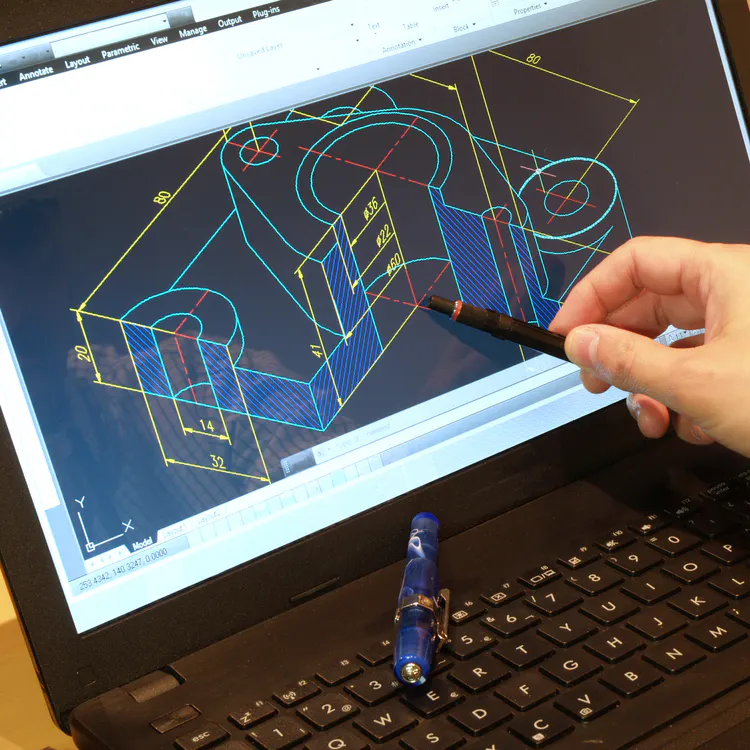
Revit® and AutoCAD® are two CAD (computer-aided design) software applications developed by Autodesk® to assist architects and engineers with their work and streamline workflows. While both packages are widely utilized for various engineering and architectural applications, the two options differ in their capabilities and, consequently, their uses. The main difference between the two is that Revit is 3D parametric modeling software used to develop, assemble, and visualize components of a design or construction project in 3D. Whereas, AutoCAD is primarily 2D drafting software with some 3D capabilities used to create and modify geometric shapes in the design of a part or a building.
Besides differences in capabilities and use, workflow and flexibility are two other significant differences. These differences make either Revit or AutoCAD more advantageous for different applications. Designers need to understand the differences and comparisons between Revit vs. AutoCAD to ensure they have the necessary tools for a successful project. This article will discuss the differences between Revit vs. AutoCAD in terms of applications, learning curve, user experience, and price.
What Is Revit?
Revit is 3D CAD modeling software, with an emphasis on building information modeling (BIM). Revit was first launched in 2000 by Revit Technology Corporation and was purchased by Autodesk in 2002. It is powerful software that not only enables the creation of 3D parts and structures according to specific dimensions but also allows users to model and describe physical interactions between components in a design.
The software’s emphasis on BIM means it is most commonly used in the MEP (mechanical, electrical, plumbing) design of new buildings. This leads to three significant advantages of using Revit:
- Clashes between components in a design (such as an HVAC duct intersecting with a plumbing line) are automatically detected. This helps reduce overall design and construction time.
- Existing 3D models can be easily modified, updated, and shared with all parties involved in the design of a particular building. Managing design changes in Revit is simple since all changes are reflected in each existing view.
- Revit uses a generative design feature in which users input parameters, and the software automatically generates features based on those inputs. Revit’s use as both a 3D CAD and BIM tool makes the software ideal when designing, building, and operating new buildings.
What Is AutoCAD?
AutoCAD is a robust 2D drafting software that was developed by Autodesk and first released in 1982. AutoCAD is a pillar of CAD software and has been used by engineers and architects for decades. It has been used to produce precise 2D lines that represent features and dimensions on various faces of a whole 3D part. With AutoCAD, designers can easily create and edit new and existing drawings for floor plans, building designs, and MEP systems.
In AutoCAD, designers can save aspects of a drawing for future use, helping drastically reduce overall design work. Files can be saved to the cloud, enabling designers to easily share and access their drawings. New 3D modeling and visualization features allow designers to work from different viewpoints, leading to more efficient design work. A key difference between AutoCAD and Revit is that design features are created one by one in AutoCAD, whereas in Revit, they are made simultaneously. For instance, in AutoCAD, creating or modifying a square requires all of its sides to be created or modified individually. While some users of the software may become frustrated with this feature, it can be an excellent way for designers to focus on one particular issue without getting lost in the nuances of the entire design.
Revit vs. AutoCAD - Use Cases and Applications
Both Revit and AutoCAD are commonly used in the construction and MEP industries. While Revit is almost exclusively used in these industries, AutoCAD is a more general-use CAD program, and its use extends far beyond them. AutoCAD is used across several industries, including aerospace, automotive, electronics, and consumer goods. AutoCAD is also often used in fashion design and interior design.
Revit vs. AutoCAD - System Requirements
When it comes to system requirements, Revit is significantly more demanding in terms of computing power than AutoCAD, due to its advanced Building Information Modeling (BIM) capabilities.
Below is a table summary of Revit’s system requirements:
Revit vs. AutoCAD - System Requirements
What Is the Operating System of Revit and AutoCAD?
Revit is compatible only with Windows, whereas AutoCAD supports both Windows and macOS.
What Are the Minimum Memory Requirements for Revit and AutoCAD?
The minimum memory requirement for both Revit and AutoCAD is 8 GB. For optimal performance, it is recommended that an even higher amount of RAM be used.
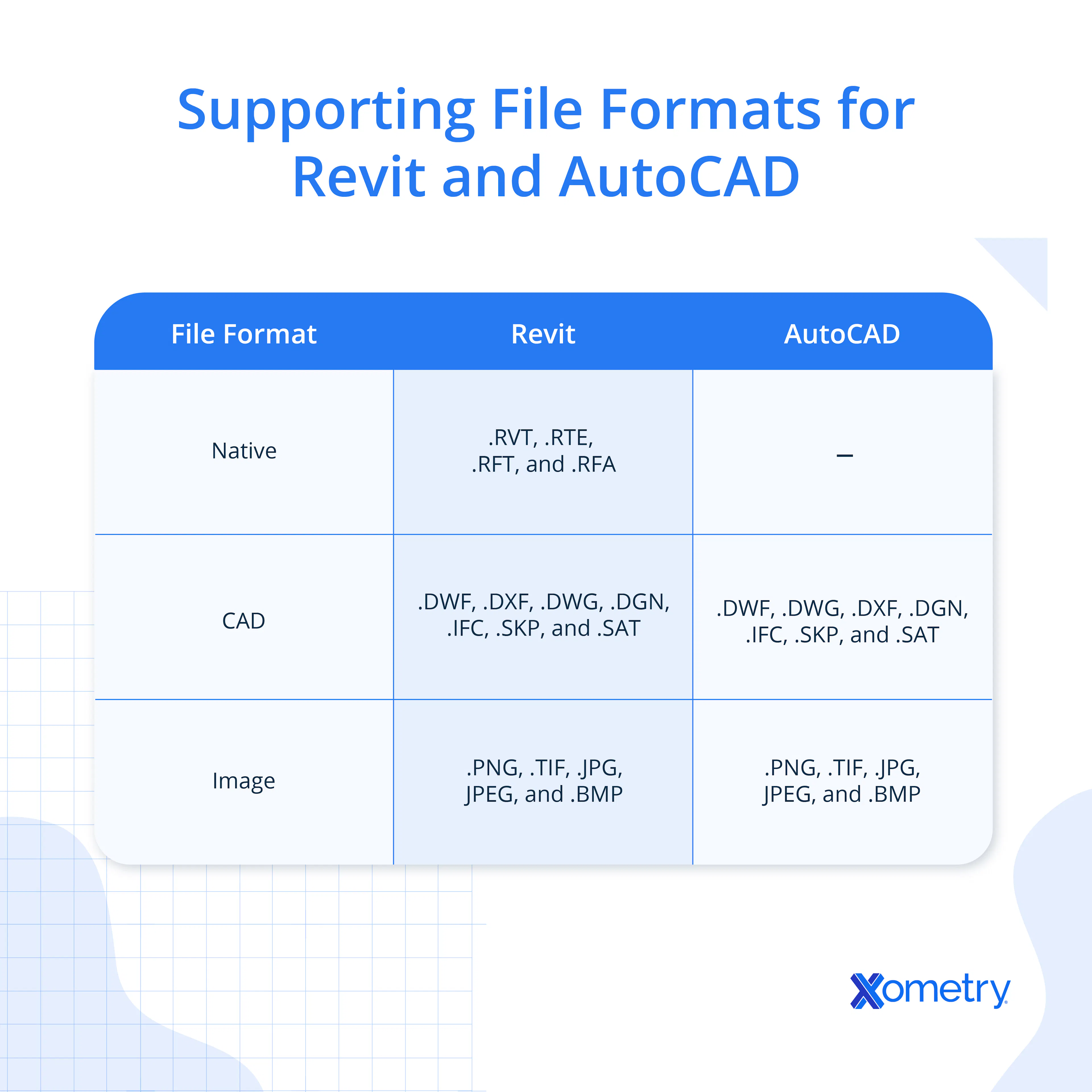
What Are the Supporting File Formats of Revit and AutoCAD?
Since Autodesk develops both Revit and AutoCAD, it supports several overlapping file formats. However, each software also has its own native formats tailored to its specific functions. Files saved in one application can often be linked or imported into the other, although full editing compatibility is not always available.
The table below outlines the primary supported file formats for Revit and AutoCAD:
Revit and AutoCAD:
Revit vs. AutoCAD - User Experience
The user experience between Revit and AutoCAD largely depends on the user’s familiarity with the software and the specific needs of their project. Revit is more powerful for large-scale designs due to its automatic clash detection and the ability to automatically update all views when a design change is made, which makes team collaboration more efficient. In contrast, AutoCAD focuses on individual components, allowing users to create highly precise 2D drafts of 3D parts and to modify specific elements with greater flexibility. However, this can make modifying entire assemblies or coordinating with a team more time-consuming, which some users may find limiting in collaborative or complex design workflows.
Learning Curve of Revit and AutoCAD
Both Revit and AutoCAD are known for their steep learning curves, particularly for new users. However, many users find Revit more challenging to learn than AutoCAD due to its complex Building Information Modeling (BIM) environment and the wide range of advanced, interdependent features that go beyond traditional drafting. Revit requires users to understand not just drawing tools but also parametric modeling, project collaboration, and data management, all of which demand extensive training and hands-on experience to utilize the software’s capabilities fully. In contrast, AutoCAD focuses more on manual drafting and geometric control, making it relatively more straightforward for beginners to grasp, especially for 2D design tasks.
Is Revit Easier To Learn Than AutoCAD?
No, Revit is generally not easier to learn than AutoCAD. While both software programs require training, Revit is more complex due to its advanced Building Information Modeling (BIM) capabilities. Unlike AutoCAD, which is primarily a 2D drafting tool with optional 3D functionality, Revit is a parametric modeling software, meaning that rules, constraints, and relationships define elements. This approach enables highly coordinated, intelligent designs but also introduces a steeper learning curve, especially for users unfamiliar with BIM workflows. In contrast, AutoCAD's manual drafting interface and linear drawing process tend to be more intuitive for beginners, particularly for basic 2D design tasks.
Revit vs. AutoCAD - Application Stability
The stability of both Revit and AutoCAD depends on a combination of the software’s internal architecture and the user’s hardware. While high-performance systems significantly improve the responsiveness and reliability of both applications, large and complex 3D models, especially in Revit, can lead to increased latency, slowdowns, or even crashes, particularly if system memory or graphics processing is insufficient. Excessively large project files, corrupt files, or unsupported plug-ins can also compromise stability. Autodesk actively maintains both Revit and AutoCAD by releasing regular patches, service packs, and updates to address bugs, enhance performance, and resolve compatibility issues as they are identified.
Revit vs. AutoCAD - Customer Support
Customer support for Revit and AutoCAD is largely comparable, as both are developed and maintained by Autodesk. Users of both applications have access to a wide range of official tutorials, documentation, and feature walk-throughs provided directly by Autodesk. Additionally, Autodesk offers live and on-demand webinars, certified training courses, and professional certification programs that help users deepen their skills and advance their careers. Beyond official resources, users can also find support through user forums, knowledge bases, and Autodesk’s technical support services. Overall, there is no significant difference in the availability or quality of customer support between the two platforms.
Revit vs. AutoCAD - Community
Since Revit and AutoCAD are both developed by Autodesk and used in many of the same industries, much of the community input for the two software packages overlaps. Several official forums sanctioned by Autodesk exist where users can seek software help, find information related to common software issues, and discuss industry trends. A quick Internet search will lead users to even more forums for both applications, where users can seek supplemental help and instruction.
Revit vs. AutoCAD - Price
Access to both Revit and AutoCAD is subscription-based and can be purchased in monthly, yearly, or 3-year increments. As of Oct. 2025, Revit costs $335/month, $2,675/year, or $7,625/3 years. AutoCAD is slightly cheaper, at a cost of $235/month, $1,865/year, or $5,315/3 years.
Other Alternatives to Revit and AutoCAD
There are several alternatives to Revit and AutoCAD on the market, including SketchUp™, DataCAD®, and Vectorworks®. In all three software examples, users can create 2D drawings and 3D models—making the three packages ideal for general CAD use as well as architectural MEP design. There are free CAD programs available, including FreeCAD® and TinkerCAD®. While the alternatives listed here aren’t as advanced as Revit and AutoCAD, they are still sound substitutes.
Revit and AutoCAD, both developed by Autodesk, serve distinct purposes within the design and engineering fields. Revit is a 3D Building Information Modeling (BIM) tool designed for integrated, data-rich architectural and construction workflows, whereas AutoCAD remains a versatile 2D drafting platform with limited 3D capabilities, suited for detailed drawings and multi-industry use. The article highlights their distinctions in functionality, learning curve, and cost, noting that Revit offers superior collaboration and modeling depth compared to AutoCAD’s flexibility and accessibility across various disciplines.
Summary
This article presented Revit and AutoCAD, explained what they are, and discussed the comparisons of each software. To learn more about 3D printing software, contact a Xometry representative.
Xometry provides a wide range of manufacturing capabilities, including 3D printing and other value-added services for all of your prototyping and production needs. Visit our website to learn more or to request a free, no-obligation quote.
Copyright and Trademark Notices
- AutoCAD®, Revit®, TinkerCAD®, and Autodesk® are registered trademarks of Autodesk, Inc. and/or its subsidiaries and/or affiliates, in the United States.
- SketchUp™ is a brand and/or registered trademark of Trimble, Inc. in the USA and/or other countries.
- DataCAD® is a registered trademark and/or service mark of DATACAD LLC.
- Vectorworks® is a registered trademark of Vectorworks, Inc.
- FreeCAD® is a registered trademark of the FreeCAD Project Association (FPA), applicable in the European Union.
Disclaimer
The content appearing on this webpage is for informational purposes only. Xometry makes no representation or warranty of any kind, be it expressed or implied, as to the accuracy, completeness, or validity of the information. Any performance parameters, geometric tolerances, specific design features, quality and types of materials, or processes should not be inferred to represent what will be delivered by third-party suppliers or manufacturers through Xometry’s network. Buyers seeking quotes for parts are responsible for defining the specific requirements for those parts. Please refer to our terms and conditions for more information.