
CNC Router vs. CNC Mill — What's the Difference?


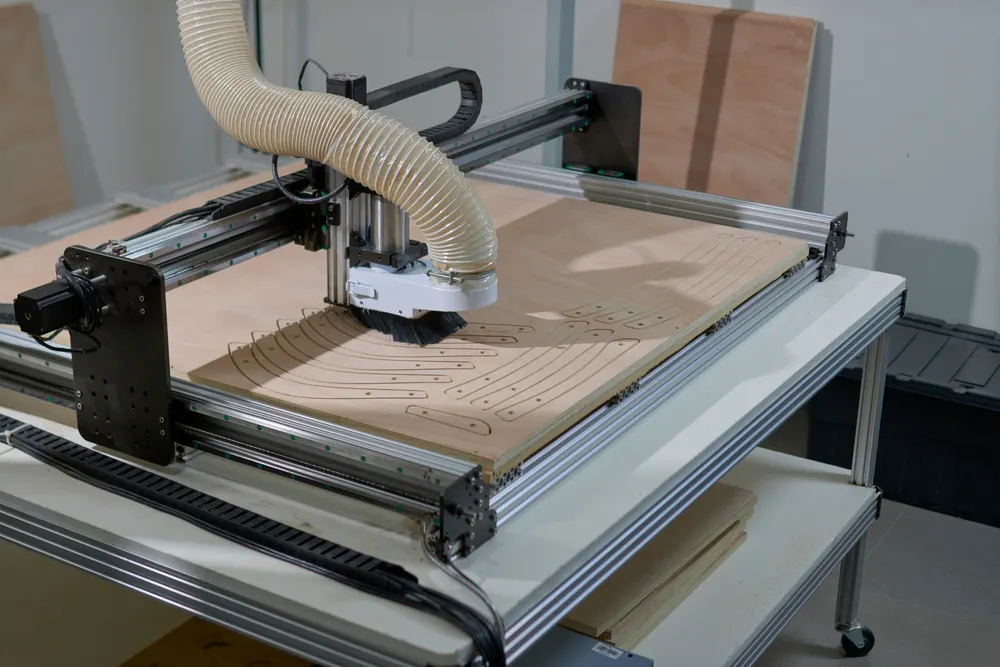
You’ll be hard-pressed to find a construction site, automotive factory, electronics facility, or medical manufacturing plant that doesn’t rely on a computer numerical-controlled cutting router or mill (or a whole row of them). Otherwise known as CNC routers and CNC mills, these machines play vital roles when it comes to creating accurate components and customized design work.
If you’re curious about the difference between the two machines, we’ve broken down how each works and where their strengths and weaknesses lie. You’ll also learn more about the services Xometry offers in the arena of CNC milling & routing.
What Is a CNC Router?
When you need to shape soft metals, plastic, and wood, a CNC router may be the perfect machine for the job. These swift tools are operated through settings that you’ll input into a computer before it jumps into action.
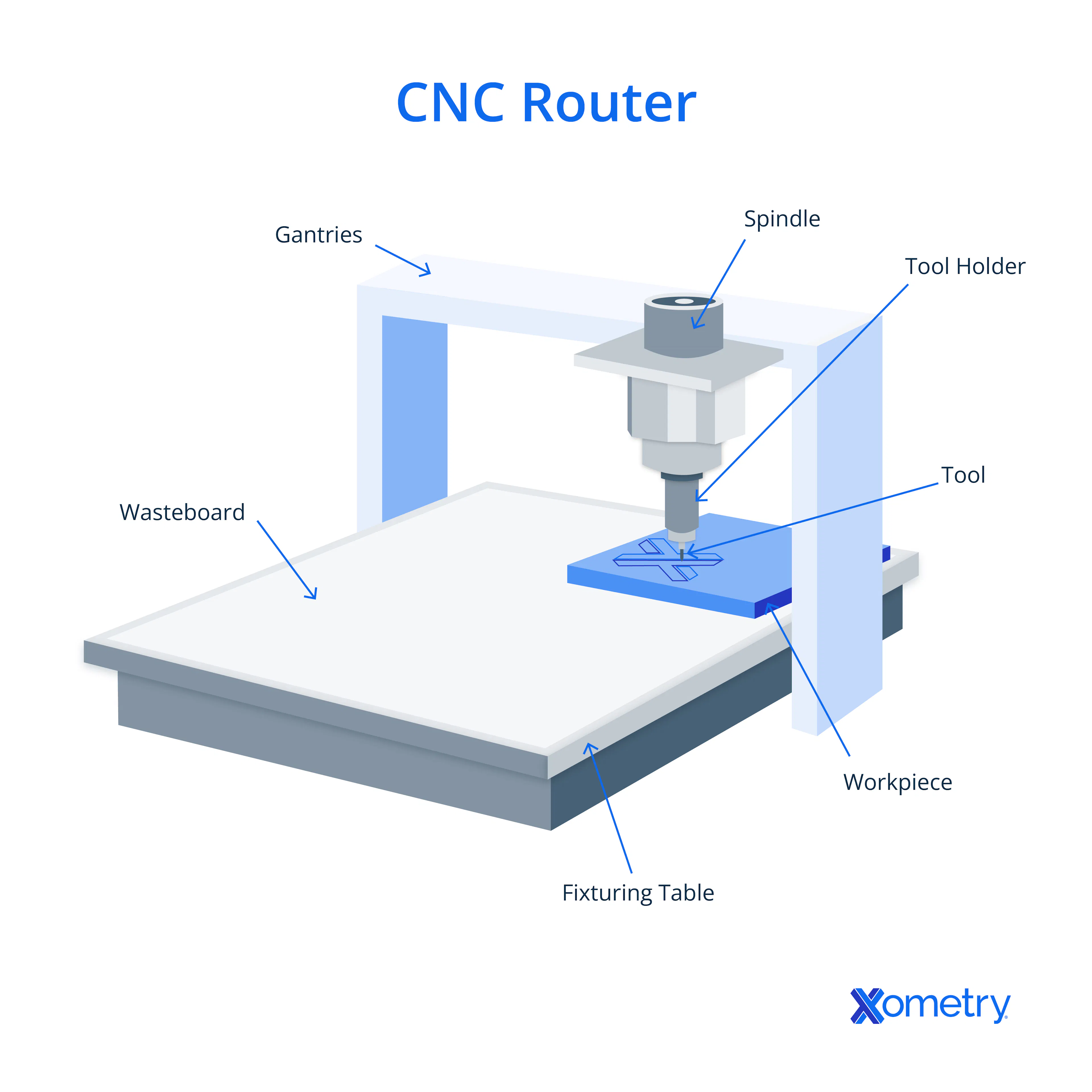
The rotating tool on the machine is usually moved around using three or more axes. These are usually X, Y, and Z axes. As it runs, it works from G-code that is generated via software and CAD, which commands the cutting tool to move along and carve a workpiece sitting atop the work table into the design that matches a corresponding 3D CAD model. The more axes, the more complex maneuvers it can make. It’s a wonderful example of automation that spans numerous sectors — whether you’re a furniture designer or a manufacturer working on billboards or signboards.
You can also use various tools with a CNC router for different effects, finishes, and angles, like face mills, drill bits, end mills, V-bits, chamfer bits, and ball nose end mills. Xometry also offers resources that’ll help you better understand machining design, including a guide that covers all there is to know about CNC routers.
What Is the Purpose of a CNC Router?
A CNC router excels in cutting, shaping, and engraving a variety of materials including wood, plastic, and soft metals, ensuring a moderate level of accuracy in the final product. Its high-speed tool rotation facilitates a smooth cut surface on these softer materials. However, when it comes to processing harder substances, the CNC router is less effective compared to a CNC mill, which is specifically designed to handle such tough materials.
What Is the Importance of a CNC Router?
The CNC router is renowned for its efficiency and versatility in manufacturing. It is an important tool in any workshop, as it significantly reduces production time and waste. It offers a rapid and cost-effective machining method for applications that demand moderate accuracy and relatively shallow cuts. Another significant feature of a router is its ability to cut larger workpieces, thanks to the gantry x-y motion system, which accommodates a large, stationary worktable.
How Does a CNC Router Work?
A CNC router is designed with a flat, stationary table to which the workpiece material is secured. A CNC router is a sophisticated machine used in manufacturing for cutting, shaping, and engraving materials like: wood, plastic, and soft metals. It operates on a Cartesian coordinate system, allowing movement along the X, Y, and Z axes. The 3-axis CNC router can move its cutting tool in three dimensions: left to right (X-axis), front to back (Y-axis), and up and down (Z-axis), making it suitable for creating flat or slightly contoured surfaces. The 4-axis CNC router adds a rotational axis (A-axis), enabling it to perform more complex operations like cutting around a cylinder or creating intricate 3D shapes. Both types use a high-speed spindle to rotate the cutting tool, carving out designs with precision. The CNC router is controlled by G-code, which is generated from a CAD design and dictates the toolpath for the router to follow.
What Are the Typical Applications for a CNC Router?
Xometry and its manufacturing facilities can use CNC routers to create things like:
- Furniture: including legs, shelves, doors, ornamental carvings and cabinetry.
- Advertising tools: signboards and logos can be created with a router.
- Musical instrument parts: including bodies for guitars and violins.
- Prototypes: for folks in architecture, construction, and engineering who need detailed models.
What Materials Can Be Worked on With a CNC Router?
CNC routers aren’t as strong as CNC mills, and specific materials, including plastic, wood, and softer metals like aluminum and brass, are better reserved for these machines. Using the wrong material can lead to a damaged machine, unworkable parts, or, worst case, safety hazards.
What Types of Tools Can Be Used With a CNC Router?
CNC routers can utilize a variety of tools such as: face mills, drill bits, end mills, V-bits, chamfer bits, and ball nose end mills. Depending on the material being machined and the desired finish of the workpiece, these tools are selected to accommodate various operations such as: shaping, engraving, and cutting.
Are CNC Routers Easier To Upgrade Than Mills?
Yes, CNC routers are generally easier to upgrade than mills. This is because CNC routers are designed with a modular structure that often allows for straightforward enhancements, such as adding a more powerful spindle or expanding the work area. Their gantry-style configuration is conducive to upgrades that can improve efficiency and versatility. In contrast, CNC mills simply don't require the same kinds of updates as the router, but rather are sold as upscale items.
What Are the Safety Considerations for Using a CNC Router?
When operating a CNC router, safety is paramount. Here are some key considerations:
- Reading the Manual: Familiarize yourself with the machine's operating instructions and safety warnings.
- Proper Training: Seek training before operating the machine to prevent injuries and machine breakdown.
- Wearing Personal Protective Equipment: Use safety goggles, ear muffs, and a dust mask. Do not wear gloves or loose clothing.
- Securing Work Area: Ensure the work area is clean, well-lit, and free from clutter.
- Machine Inspection: Verify the power is off before plugging in the machine and inspect all parts for damage.
- Material Handling: Ensure workpieces are securely clamped down to prevent shifting during operation.
- Focus: Always keep your focus on the work being done and avoid distractions.
These practices help maintain a safe, productive environment and prevent workplace accidents.
What Are the Best CNC Routers?
Selecting the best CNC router depends on your budget and the materials you plan to work with. Here are some of the top picks:
- SainSmart Genmitsu CNC Router Machine: This router is appreciated for arriving at its destination already partly assembled, which reduces setup time. It is designed for quiet operation and includes safety features such as acrylic baffles and emergency stop controls. In the context of CNC routers, acrylic baffles help contain debris and provide a safety barrier between the user and the moving parts of the machine.
- MYSWEETY CNC Pro Engraver Machine: Ideal for beginners, this machine is known for its accuracy and ease of use. It comes with a solid build and is also equipped with a laser engraver, although it does not include software.
- Genmitsu CNC Router Kit: A great choice for complete beginners, this model uses flexible hardware and open-source software, making it easier to upgrade. The spindle of the CNC router can be replaced with a laser module, which is a relatively straightforward process. This modularity allows users to expand the machine’s capabilities without purchasing a new setup.
- Mcwdoit CNC 3018 Pro Router: Best for desktop use, this router is compact yet capable, and suitable for smaller projects and spaces.
What Are the Advantages of CNC Routers?
There are several advantages that a CNC router provides. Here are a few you should note:
- High accuracy: CNC routers can whip up top-tier, accurate designs in less time than manual methods. The standard numerical tolerance level for a CNC router is ± 0.005 inches or 0.13 mm.
- Complex and intricate designs: Even basic CNC routers are great for crafting intricate designs that require relief sculpting, such as a 2.5D topographical terrain model. More advanced machines can go further and reach more complex angles to create things like sculptures.
- Less waste: Because you can specifically program where the router makes its cuts, they are more efficient, and less waste is created than with manual methods.
- Space-saving design: CNC routers are usually more compact than other machines that provide similar services, making them a great addition to workshops that have space considerations to make.
What Are the Disadvantages of CNC Routers?
Along with advantages, a CNC router comes with several disadvantages, too:
- Noisy machines: The vacuum and extraction systems, as well as the spindle movement, lead to a loud operation, so be sure to wear hearing protection.
- Dust creation: Even with their extraction systems, CNC routers can still produce quite a lot of dust, so put measures in place to manage this.
- Less accurate than mills: While they can be accurate, CNC routers don’t provide the same level of accuracy and detail that mills can achieve.
- Depth of cuts is shallower: CNC routers can’t get the same level of depth in their cuts as mills do.
- Material limitations: It’s best to use softer materials with CNC routers, as routers can’t safely and effectively slice through harder workpieces.
What Maintenance Do CNC Routers Need?
For optimal operation, CNC routers need to have regular maintenance performed. Important tasks include: lubricating properly, tightening belts, tightening screws, cleaning dust, and inspecting the water and air cooling systems. The machine’s life and dimensional accuracy can be extended with a regular maintenance program.
"I use a CNC router when working on flat stock materials that do not have a high level of depth such as sheets of wood or plastics. CNC mills give much more freedom in the Z axis to build complex contours and shapes and is best left to creating individual parts vs. panels."
What Is a CNC Mill?
Mills are another machine you’ll come across in the world of CNC machines, and they’re well known for their ability to cut through tougher materials and create more precise features and finishes. It’s also a helpful machine when you’re working on larger-scale projects or need to reproduce components quickly.
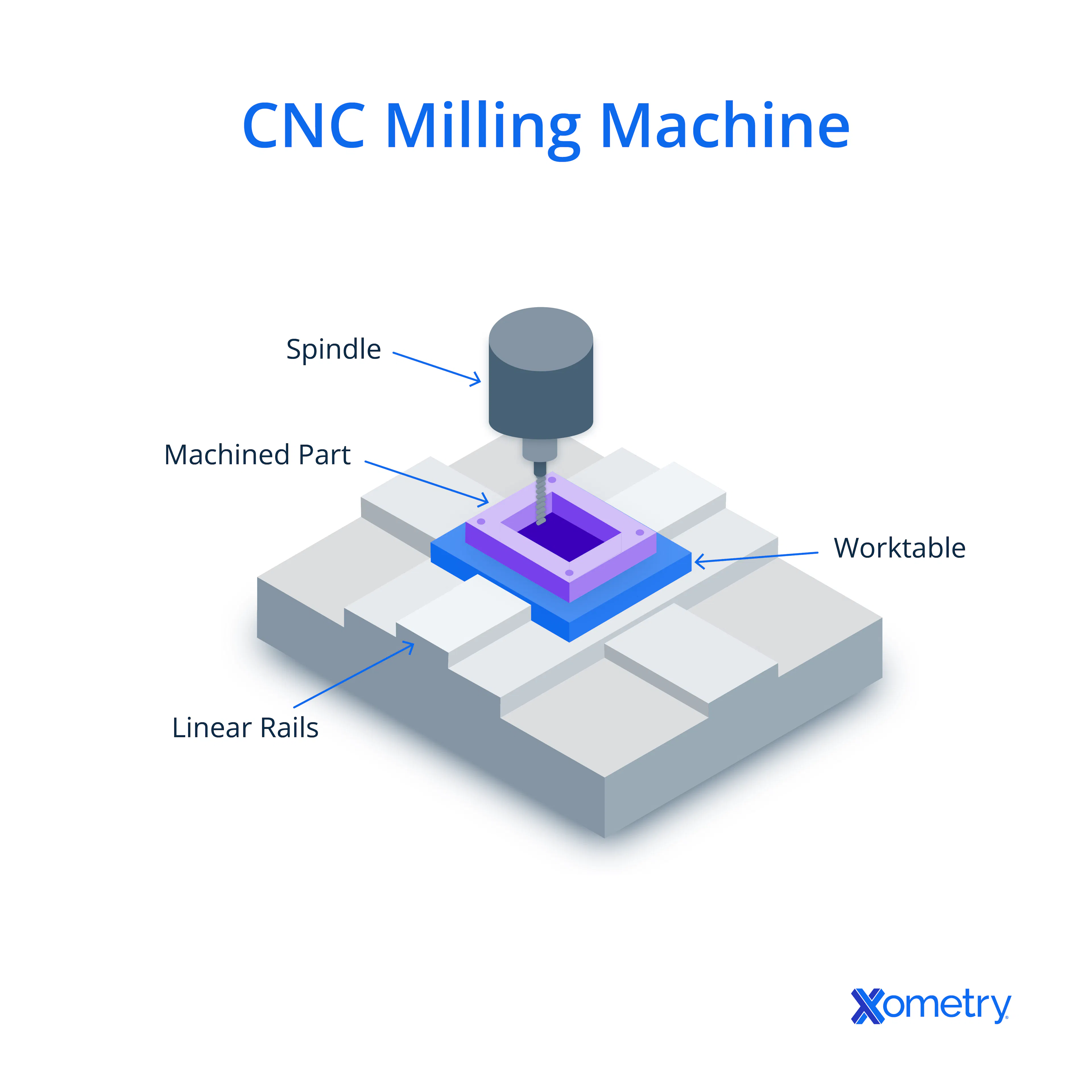
Like a router, a CNC mill works by running a spinning cutting tool on several axes across raw material. A combination of CAD and CAM software is used to create the G-code and toolpaths that the machine uses to create parts.
Xometry also has CNC milling services, which include rapid prototyping in a range of plastics, metals, and other materials you can choose from, precision machining at industry standards, design feedback, and advanced capabilities (for all those five-axis and right-angle milling needs).
How Does a CNC Mill Work?
A CNC mill removes material from a workpiece using a spinning cutting tool. The machine moves the tool along several axes to shape the material into the required shape according to a computer program, commonly in G-code. This technology makes it possible to manufacture parts for a variety of industries with high accuracy and complex geometries. CNC mills can produce complex and detailed parts because they can work on several axes, usually three to five. CNC routers excel with softer materials and offer expansive work areas ideal for large sheets. Conversely, CNC mills are tailored for hard materials like steel and titanium, featuring smaller workspaces that accommodate compact, hard material blocks.
What Is the Purpose of a CNC Mill?
The purpose of a CNC mill is to remove material from a workpiece to create accurate and complex parts. It is essential in industries that demand high accuracy, such as aerospace and electronics, where it is used to machine a variety of materials into final components.
What Is the Importance of a CNC Mill?
CNC mills are essential to modern production because of their great precision and reproducibility in producing complicated parts. They are essential for sectors like aerospace and medical device manufacturing that have high standards. The precision of CNC mills leads to improved efficiency, reduced waste, and the ability to fabricate intricate designs that would be impossible with manual machining.
What Types of Materials Can a CNC Mill Work With?
CNC mills can slice through soft materials like butter, but their real specialty lies in tougher materials that CNC routers can’t get through. These hard materials include tool steel, stainless steel, titanium, Inconel, composites, ULTEM, brass, and copper.
What Are the Features of Xometry’s Custom CNC Milling Services?
Xometry's custom CNC milling services boast a wide array of features, including:
- Rapid Prototyping: Quick turnaround for CNC milled parts and prototypes.
- Material Variety: A broad selection of materials, including metals and plastics.
- Precision Machining: High-quality milling following AS9100D and ISO 9001:2015 certifications.
- Advanced Capabilities: Support for 5-axis and right-angle milling.
- Design Feedback: Instant quotes with design-for-manufacturability feedback on materials and processes.
Can a CNC Mill Be Used for Large-Scale Production?
Yes, a CNC mill can be used for large-scale production. CNC mills offer various space options, allowing for flexibility in accommodating different project sizes. They are appropriate for projects requiring deeper cuts due to their deeper Z-axis.
What Are the Typical Applications for a CNC Mill?
There are many uses for why you’d want to use a CNC mill. Here are a few Xometry has helped its customers with:
- Automotive parts like cylinder heads, camshafts, control arms, rotors, intake manifolds, and more.
- Medical devices such as surgical tools, implants, and prosthetics.
- Aerospace parts like landing gear, housings, customized fasteners, and brackets.
- Tooling, such as molds for injection molding and die-casting.
Need Custom CNC Machined Parts?
Can CNC Mills Be Used for Metalworking?
Yes, CNC mills are highly suitable for metalworking. They can cut delicately and precisely as required by their programming, even with hard materials such as: titanium, steel, and aluminum. Mills produce lots of torque, which gets converted to the force needed to cut the metal. In contrast, routers, due to their distinct construction, are unable to exert the same level of force on a workpiece.
What Are the Maintenance Requirements for CNC Mills?
The maintenance requirements for CNC mills include: regular lubrication of moving parts, cleaning of chips and debris from the machine bed and cutting area, calibration of machine parameters, and periodic inspection of tooling for wear and damage. Additionally, it is crucial to follow the manufacturer’s recommendations for specific maintenance tasks and schedules.
Do CNC Mills Use More Power Than Routers?
Yes, CNC mills typically use more power than routers. This is so because mills need greater torque to cut through harder materials, which increases power consumption. Even though they are faster, routers require less power because they often work with softer materials.
What Are the Advantages of CNC Mills?
If you’re considering working with a CNC mill, here are some of the best benefits of doing so:
- Extremely precise: CNC mills can cut with very high accuracy and create precise parts you won’t be able to get as easily (or if at all) from a router. Xometry often mills parts with feature tolerances of +/- 0.001" or less.
- More material opportunities: CNC mills have the power, speed, and adaptability to remove chunks from tougher materials. Routers simply don't have the horsepower or tooling options to cut tough and hard materials.
- Easy automation: You can automate the production and processes for a CNC mill, leading to far less manual labor for you or your team. For example, some of Xometrys manufacturing partners use robotic pallet loaders to achieve lights-out production.
- Deeper cuts: With a CNC mill, you can create deeper cuts and up spindle speeds to improve the material removal rate.
What Are the Disadvantages of CNC Mills?
There are also a few disadvantages that come with working with a CNC mill:
- Expensive upfront costs: CNC mills are far more expensive than CNC routers, and you’ll be looking at several thousand dollars to purchase one on the lower end. They can cost up to $150,000 or more, whereas routers can start around a couple hundred dollars.
- Skilled operators are required: CNC mills, especially ones with more than three axes, are complex machines. Running them requires proper training and experience to unlock their full capabilities.
- Larger footprint: Although desktop size machines exist, CNC mills generally require more square footage than routers do. They may also have higher energy requirements, such as 240V to 400V+ three-phase connections.
What Are the Safety Considerations for Using a CNC Mill?
By and large, the safety considerations for using a CNC mill are similar to those for other machining equipment, including CNC routers:
- Training and Familiarization: Operators must be thoroughly trained on the specific CNC mill they will use.
- Protective Gear: Safety glasses or goggles, and hearing protection are essential to shield against flying chips and loud noise.
- Machine Inspection: Before use, check that all guards are in place and the workpiece is securely clamped.
- Clean Workspace: Keep the mill surfaces and shop floor free of cuttings and dust to prevent slips and fire hazards.
- Avoid Loose Items: Do not wear gloves, loose clothing, jewelry, or have loose hair that could get caught in moving parts.
- Emergency Procedures: Know the location of emergency stop controls and how to use them.
- Correct Use of Cutting Fluids: Utilize appropriate cutting fluids to ensure efficient and safe milling operations.
- Maintenance: Regularly inspect the machine for damaged parts and tools, ensuring everything is in proper working order.
How Xometry Can Help
Our in-house and global manufacturing network allows us to offer virtually limitless potential when it comes to CNC projects. From quick turnaround one-offs and prototypes to higher volume production runs using parallel production to 5-axis milling and more, we have the solutions to meet your project's needs.
Best of all, we can automatically quote most CNC projects instantly. You can start by uploading your 3D CAD files to the Xometry Instant Quoting Engine® to get your instant quote today!
Disclaimer
The content appearing on this webpage is for informational purposes only. Xometry makes no representation or warranty of any kind, be it expressed or implied, as to the accuracy, completeness, or validity of the information. Any performance parameters, geometric tolerances, specific design features, quality and types of materials, or processes should not be inferred to represent what will be delivered by third-party suppliers or manufacturers through Xometry’s network. Buyers seeking quotes for parts are responsible for defining the specific requirements for those parts. Please refer to our terms and conditions for more information.